Power outages are more than just an inconvenience; they can disrupt your work, damage sensitive electronics, and leave you in the dark. A reliable battery backup, or Uninterruptible Power Supply (UPS), is a critical line of defense for your home office, entertainment center, and network equipment. It provides immediate power during short outages, giving you time to save your work and shut down properly, while also guarding against damaging power surges and brownouts.
Choosing the right unit depends on your specific needs, from protecting a single computer to running essential appliances for hours. This roundup covers a range of solutions, from compact standby UPS systems for basic protection to high-capacity pure sine wave models for sensitive electronics and even portable power stations for extended runtime and versatility. Our goal is to help you find the perfect balance of power, performance, and protection for your home.
Our Recommended Battery Backup Solutions
- Vertiv Liebert PST5 UPS – 850VA/500W Standby Power
- Amazon Basics UPS Battery Backup & Surge Protector 600VA
- CyberPower CP1500PFCLCD PFC Sinewave UPS Battery Backup
- Eaton 5SC1500 Pure Sinewave UPS Battery Backup
- Tripp Lite SMART1500LCDT 1500VA 900W UPS Battery Back Up
- APC UPS Back-UPS Pro, 1500VA Sinewave UPS Battery Backup
- BLUETTI AC200PL Portable Power Station, 2304Wh Solar Generator
- Anker 521 Portable Power Station Upgraded with LiFePO4 Battery
- Schneider Electric OffGrid 517Wh Portable Power Station
- Jackery Explorer 1000 Portable Power Station
Vertiv Liebert PST5 UPS – 850VA/500W Standby Power

This Vertiv Liebert unit is a solid, Energy Star certified choice for protecting home office setups and network equipment. It offers a balanced combination of eight outlets, with four providing full battery backup and surge protection and four dedicated to surge protection only. The inclusion of widely spaced outlets is a thoughtful design for bulky power adapters.
An informative LCD screen provides clear status updates, and the free shutdown software ensures your computer can safely power down during an extended outage. For comprehensive protection, it also includes RJ45/RJ11 data line surge protection, safeguarding your modem or router from voltage spikes coming through phone or network lines.
Amazon Basics UPS Battery Backup & Surge Protector 600VA

For those seeking essential power protection without complexity, the Amazon Basics 600VA UPS delivers reliable performance. Its compact design makes it ideal for powering home networks, Wi-Fi routers, and streaming devices, providing enough time to navigate short power interruptions or initiate a proper shutdown.
This model features eight outlets, split evenly between battery backup and surge-only ports. While runtime is limited at full load, it offers approximately nine minutes of power at half load, which is sufficient for most basic networking gear and IoT devices. It represents a straightforward and accessible entry point into home power protection.
CyberPower CP1500PFCLCD PFC Sinewave UPS Battery Backup

The CyberPower CP1500PFCLCD is a top-tier unit designed for demanding electronics like gaming PCs, high-end workstations, and servers. Its 1500VA/1000W capacity and pure sine wave output ensure compatibility with active PFC power supplies, preventing potential shutdowns or hardware issues that can occur with simulated sine wave models.
This UPS is packed with features, including twelve outlets, a multi-colored LCD that tilts for better visibility, and automatic voltage regulation (AVR) to correct minor power fluctuations without draining the battery. It also includes two USB charge ports (Type-A and Type-C), making it a versatile power hub for your entire setup.
Eaton 5SC1500 Pure Sinewave UPS Battery Backup
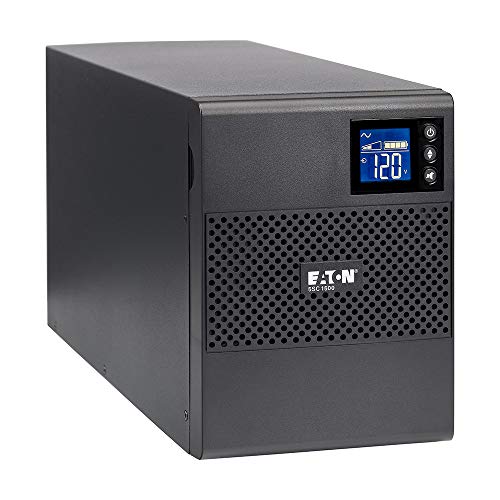
Eaton is a trusted name in power management, and the 5SC1500 model lives up to that reputation. It delivers a clean, stable pure sine wave output, which is essential for protecting sensitive electronics like audio/video equipment, medical devices, and computers with active PFC power supplies from potential damage or performance issues.
Despite its robust 1440VA/1080W capacity, this UPS features a compact design that fits well in smaller spaces. It includes automatic voltage regulation to handle under-voltages and over-voltages, and its plug-and-play operation with broad OS compatibility makes setup and integration simple for any user.
Tripp Lite SMART1500LCDT 1500VA 900W UPS Battery Back Up

The Tripp Lite SMART1500LCDT offers professional-grade protection for home servers and sophisticated computer setups. With ten outlets and a substantial 900W of battery backup power, it can keep multiple critical devices running during an outage. It also includes robust data line protection for both Ethernet and telephone/DSL lines.
A key feature is its automatic voltage regulation (AVR), which instantly corrects brownouts and overvoltages within a wide range without consuming battery power, thereby extending the battery’s life for true outages. This unit is backed by a 3-year warranty and $250,000 connected equipment insurance for added peace of mind.
APC UPS Back-UPS Pro, 1500VA Sinewave UPS Battery Backup

APC by Schneider Electric is a leader in the UPS market, and the Back-UPS Pro BR1500MS2 is a popular choice for good reason. It provides pure sine wave output and automatic voltage regulation, making it a safe and reliable battery backup for computers, home entertainment systems, and other high-performance electronics.
This model features ten outlets, with six offering battery backup and four providing surge protection only. It includes a data port for use with APC’s PowerChute management software, which allows for automated system shutdowns and detailed power monitoring. Its proven track record makes it a go-to option for dependable home power protection.
BLUETTI AC200PL Portable Power Station

For those needing extended runtime beyond a few minutes, the BLUETTI AC200PL is a massive step up. This portable power station boasts a 2304Wh capacity, expandable with additional batteries, and can power household appliances, medical devices, and even RV systems for hours, not minutes.
It features a powerful 3600W AC inverter with four outlets and supports incredibly fast recharging, reaching 80% in about 60 minutes via AC input. Built with long-life LiFePO4 batteries and advanced battery management, it offers a safe and durable power solution for emergencies, outdoor adventures, or as a whole-home backup for essential items.
Anker 521 Portable Power Station Upgraded with LiFePO4 Battery

The Anker 521 is a compact yet capable power station perfect for short-term outages or powering devices on the go. Its 256Wh capacity is sufficient to charge laptops, phones, and small appliances. The use of LiFePO4 battery technology promises a decade-long lifespan, making it a long-term investment in power security.
This unit includes six ports, featuring two AC outlets, USB-A, and a 60W USB-C Power Delivery port for fast charging modern devices. Its SurgePower technology supports a 600W peak output, allowing it to handle the startup surge of smaller motors and power tools, adding to its versatility.
Schneider Electric OffGrid 517Wh Portable Power Station

From another industry leader, the Schneider Electric OffGrid power station combines a substantial 517Wh capacity with a remarkably lightweight design of just over 12 pounds. This makes it highly portable for use around the house, in the backyard, or on camping trips.
Built with premium LG battery cells, it is engineered to retain over 80% of its capacity after 1,000 charge cycles. It offers multiple recharge options, including wall, car, and solar, and can even be charged via AC and DC simultaneously to reduce downtime. A built-in wireless charging pad adds convenience for compatible smartphones.
Jackery Explorer 1000 Portable Power Station
Jackery is a well-known brand in the portable power space, and the Explorer 1000 model offers a great balance of capacity and portability. With a 1000Wh rating, it provides ample power to run mini-fridges, CPAP machines, lights, and electronics for several hours during a blackout or for a weekend camping trip.
It features multiple output ports, including AC, USB, and DC, to accommodate a wide array of devices. Known for its user-friendly design and reliable performance, the Jackery Explorer 1000 is a versatile solution for anyone needing substantial off-grid or backup power that is easy to transport and use.
Buying Guide: How to Choose the Best Battery Backup for Your Home
When my power flickers or goes out completely, my first thought isn’t about the lights; it’s about my computer losing an unsaved document, my modem shutting down and killing my internet, or my sump pump stopping. A good battery backup, or Uninterruptible Power Supply (UPS), is my go-to solution for these problems. But choosing the right one isn’t as simple as grabbing the first unit you see. Let me walk you through what I consider when picking the best battery backup for home power protection.
The first and most critical step is figuring out how much capacity you need. This is measured in Volt-Amps (VA) and Watts (W). VA is the total apparent power, while Watts is the real power the device consumes. I always look at the Watt rating first because that’s the true measure of load. To find out what you need, add up the Wattage of all the devices you want to plug into the UPS. For a home office setup, that might be a computer (200-300W), a monitor (30-60W), and your internet modem/router (10-20W). A unit rated for 500-600W would be a safe bet here. For larger appliances like a sump pump or a home server, you’ll need to check their specific power demands, which are often listed on a label on the device itself.
Next, you need to think about the battery runtime. This tells you how long the UPS can power your connected equipment after the main electricity fails. A higher VA/Watt rating generally means a longer runtime for the same load, but runtime is also directly tied to how much you’re plugging in. Manufacturers provide runtime charts, so I always check those. If you just need enough time to safely save your work and shut down your computer, 5-10 minutes is plenty. If you need to keep your internet running through a short outage or keep a sump pump going during a storm, you’ll want to look for a unit that offers longer runtimes, potentially looking at models that allow for external battery packs.
The type of power protection is another big decision. There are three main types: Standby, Line-Interactive, and Online Double-Conversion. For most home uses, a Line-Interactive UPS is the sweet spot. It does a great job of correcting minor voltage sags and surges without switching to battery power, which helps conserve battery life for actual outages. It’s the technology I recommend for the vast majority of home power protection needs, from computers to entertainment centers.
Finally, don’t overlook the outlets and features. Make sure the unit has enough outlets for all your gear, and pay attention to which ones are battery-backed and which are only surge-protected. I always look for units that include USB ports for charging phones and, more importantly, USB data ports that allow you to connect the UPS to your computer. This enables software monitoring, which can automatically save your files and safely shut down your system during an extended outage. This single feature has saved me from lost work more times than I can count.
FAQ
What is the difference between a UPS and a surge protector?
A surge protector is a passive device that only guards against sudden voltage spikes, like those from lightning strikes. It’s a one-and-done protection; a large enough surge will destroy it. A UPS, or Uninterruptible Power Supply, contains a battery. It not only provides surge protection but also instantly supplies battery power to your devices when the main electricity fails. This gives you time to work through short outages or shut down your equipment gracefully during long ones, offering a much higher level of security for your electronics.
How long will a battery backup last during a power outage?
There’s no single answer, as it depends entirely on two things: the capacity of the UPS and the total power draw of the devices plugged into it. A small 450VA unit might only run a Wi-Fi router and modem for an hour or two, but that same unit might only power a gaming PC for 5-10 minutes. The more watts your equipment pulls, the shorter the runtime. You should always consult the manufacturer’s runtime charts for specific estimates based on different load levels to find the best battery backup for your expected needs.
Can I plug a power strip into my UPS?
I strongly advise against plugging a basic, non-managed power strip into your UPS. These power strips often have components that can introduce noise or cause an overload, potentially damaging the UPS or creating a fire hazard. The outlets on the UPS are designed for a specific total load. If you need more outlets, your best bet is to purchase a UPS with a sufficient number of outlets built-in. Some UPS manufacturers sell specific, compatible expansion units, which are the only safe add-ons to consider.
Do I need to replace the battery in my UPS?
Yes, absolutely. The battery inside a UPS is typically a sealed lead-acid battery, similar to a car battery, and it has a finite lifespan. Most will need replacement every 2 to 5 years, depending on the model, how often it’s used, and the ambient temperature. Many units have a warning light or will beep to tell you when the battery is weak. Replacing it is crucial for maintaining reliable home power protection, as an old battery won’t hold a charge and will leave you vulnerable during an outage.
What kind of devices should I plug into a battery backup?
Focus on plugging in sensitive electronics and critical devices. For me, that means my desktop computer, monitor, external hard drives, and my network equipment (modem, router, network switch). You might also consider your television, gaming console, or a landline phone base. Avoid plugging in high-wattage appliances like space heaters, laser printers, or vacuum cleaners, as their high power surge when starting up can overload and damage the UPS.
Are all the outlets on a UPS battery-backed?
Not necessarily. This is a very common point of confusion. Most UPS models have a mix of battery-backed outlets and surge-protection-only outlets. The surge-only outlets will not provide power during an outage. The unit’s manual or a label on the back will clearly indicate which outlets are which. I always do a quick test when I set up a new UPS by unplugging it from the wall and seeing which devices stay on. This confirms I’ve plugged my critical gear into the right spots.